New customers · on Google
Google’s AI agent
- Answers from your listing and your website
- Hands allergy, health and special requests to you
- Sends bookers to the Book link on your listing
Google is inviting beauty studios to a free AI agent that answers people who find you on Search and Maps. It only knows what your listing and website say. BukaTime makes sure that’s everything you know, so you’re ready on the day your invite lands.
Strangers and regulars ask different things. Each gets an agent built for the question.
New customers · on Google
Your clients · on BukaTime
Before you sign up
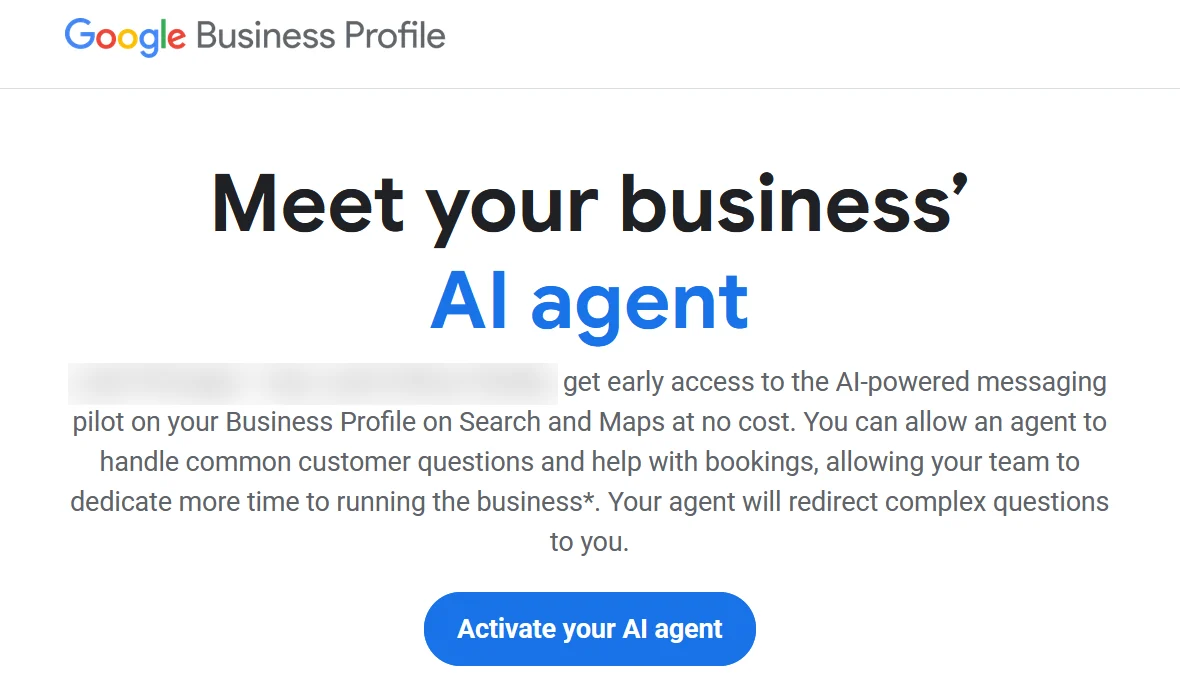
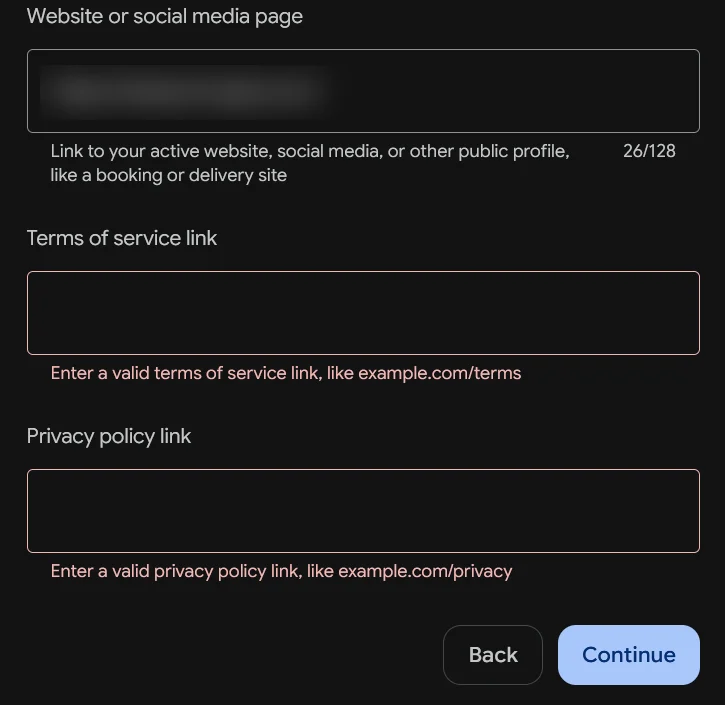
The invite arrives by email from Google Business Profile. Activating it takes a few minutes, but one step stops many studios: Google won’t let you continue without a link to your terms of service and another to your privacy policy.
No links, no agent. If your website doesn’t have these pages yet, it’s a one-afternoon job. Here’s what each should cover.
Page one
Page two
Write it the way you’d explain it at the front desk. Clear beats legalese.
Squarespace, Wix and Shopify all have policy templates in their settings. Fill in your studio’s details and publish.
Check its footer or settings. It may publish a policy, but often that one covers the software company, not your studio.
Put both pages in your website’s footer, and paste their addresses when Google asks for them.
With BukaTime
Every BukaTime studio website comes with its own Terms, Privacy Policy and Contact page, written from your studio’s settings and linked in the footer. Answer a few questions about how you work, and they’re tailored to you. When Google asks for the links, you paste these and continue.
What to enter in Google’s sign-up
Replace yourstudio with your studio’s address. You’ll find it in BukaTime under Website.
Google’s agent only knows what your listing and website say. Missing or outdated details don’t just leave a question unanswered: the agent hands the client back to you, and if you don’t reply within an hour, it tells them to call.
Google brings new clients to your door. BukaTime gets them booked, and keeps them coming back.
Discover · Google
A new client asks about prices or aftercare. Google’s agent answers from your BukaTime site.
Book · BukaTime
Your Book link opens your real availability. A few taps, a deposit if you take one, and it’s on your calendar.
Return · BukaTime
Moving a fill or running late? Your AI receptionist knows them and handles it on your calendar.
Learn · Both
What you teach BukaTime goes on your FAQ page, so Google’s agent learns it too.
Your FAQ page carries structured data, so search engines know each question and its answer.
Your studio site is pre-built and served from a global network, so it opens quickly on any phone.
Settings shows what’s done and what’s left, from your listing link to your published answers.
You already answer the same questions every week. When the AI doesn’t know something, it hands the question to you. You reply once, and BukaTime distills your reply into the fact underneath it, without the client’s name or their appointment. From then on that answer works everywhere: in your inbox, on your website’s FAQ page, and wherever Google’s agent reads it.
Your website shows each answer under its topic. What a client wrote to you never goes on it.
In Studio Configuration → General, a checklist under your Google listing walks you through it.
Paste your BukaTime site into your Business Profile’s website field. That’s what Google’s agent reads.
One switch puts your saved answers and booking policy on an FAQ page of your site.
When Google invites you, switch it on under Messages. Bookers use your Book link, straight into your calendar.
Yes. Google’s sign-up won’t continue without a link to each. Every BukaTime studio site already has them, tailored to your studio, plus a Contact page for client requests.
Not yet. Google is running an invite-only pilot that widened on October 20, 2026, in the US, UK, France and Germany, for restaurants, beauty and vehicle services. Watch your inbox for an email from Google Business Profile.
Your Business Profile and your website. Google says it hands health, allergy and special requests to you, and asks you to reply within an hour.
It helps people book through the Book link on your listing. Point that link at your BukaTime booking page and those bookings land in your calendar.
BukaTime. Texts from clients you already have — moving a fill, running late, confirming — go to your BukaTime inbox, where the AI receptionist answers from your real calendar, or drafts the reply for you to approve.
Only people whose phone and carrier support RCS messaging. Google forwards everyone else’s texts to your phone.
14 days free, no credit card. Setup takes under five minutes.
Start freeGoogle and Google Business Profile are trademarks of Google LLC. BukaTime is not affiliated with or endorsed by Google. Google’s agent is a Google pilot; its availability and behaviour are Google’s, as described on its Business Profile Help pages as of October 2026.