Your own booking site, live on day one
Clients book on a page with your name, photos and services, at yourname.bukatime.com. Built for phones first.
How it works →
Features
Every screenshot on this page is the working app, running a demo studio — nothing is mocked up. Each feature links to the Help Center article that walks you through it.
AI receptionist add-on, $30/mo per location — 250 client requests a month, small talk free Everything else is on every plan, priced per chair
Booking Engine
Clients book on a page with your name, photos and services, at yourname.bukatime.com. Built for phones first.
How it works →When nothing fits, clients join the waitlist with the service, provider, days and times they want.
How it works →
Paste one snippet and the booking flow lives on your site, resizing itself to fit the page.
How it works →Clients sign in to book, view, move or cancel their appointments without calling you.
When a client doesn’t mind who, BukaTime picks a provider who offers that service and is free.
How it works →Clients can never book over each other. Your team can overlap on purpose, if their role allows, after a clear warning.
How it works →Each appointment keeps the price and length it was booked at, so editing your menu never reprices a booked visit.
How it works →Calendar & Operations
Drag to move a visit or hand it to someone else, resize to change its length, filter by staff. Every move asks before it saves.
How it works →
Each person’s hours and your closed periods are drawn right on the calendar.
How it works →Add a lunch, a training day or a vacation, and nobody can book into it.
How it works →Rebook a client’s next appointment in one step, straight from today’s.
How it works →Each appointment keeps a history of who created, moved, edited or cancelled it, and when.
Client Intelligence
Every past and upcoming visit, with a summary of how often they come in.
How it works →
Every reminder, confirmation and reply your studio sent, with its real outcome. Texts show delivered or failed, straight from the carrier.
How it works →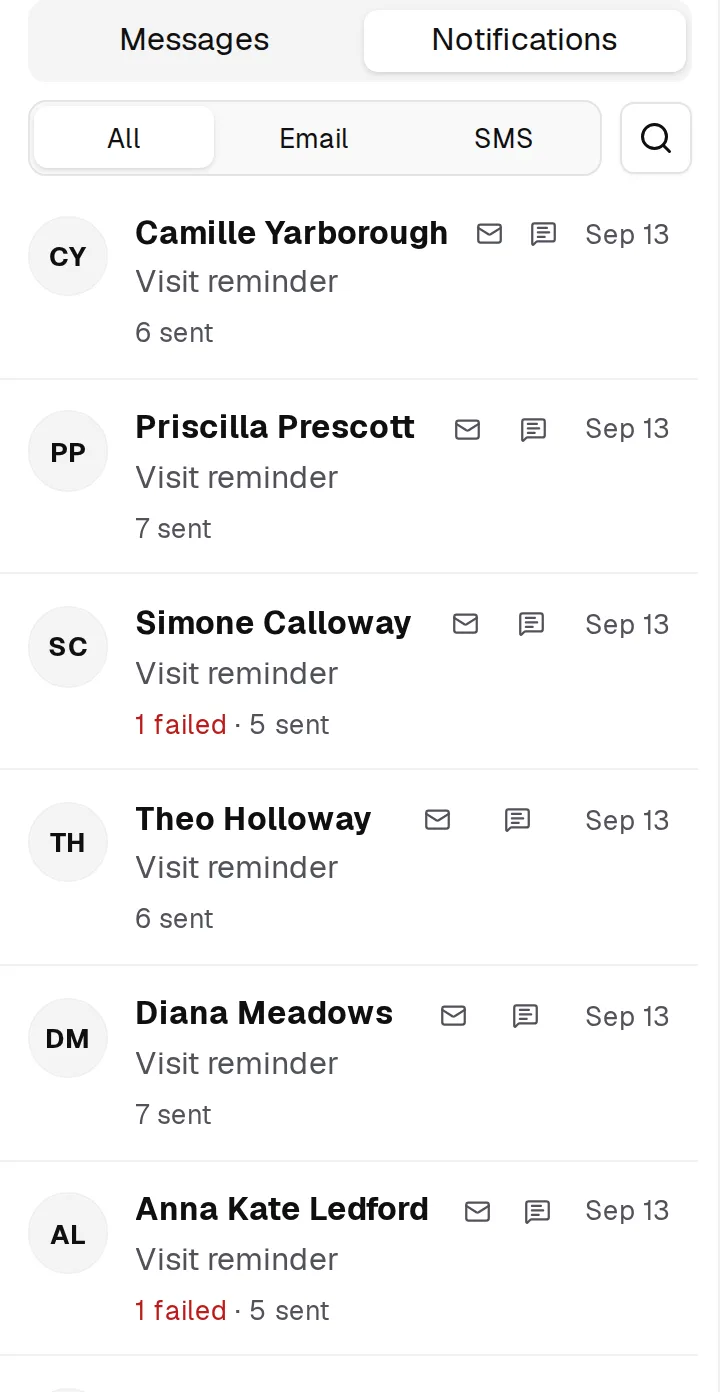
Contact details, preferences and private notes your whole team can see.
How it works →Every text and email you’ve exchanged with a client, together in one conversation.
How it works →Messaging & AI
It reads what clients send, checks your real calendar and menu, and drafts the reply — or handles it, if you let it.
How it works →
Reply to clients by text or email from a shared inbox, and archive a thread when it’s done.
How it works →
Clients can text back to any message your studio sends, and their replies are never routed to another business.
See how many of your plan’s pooled texts you’ve used this month, right in the app.
How it works →Client conversations sit beside studio alerts, updating live, and each alert stays until the problem behind it is solved.
It matches the service and provider a client asks for to your menu, then books the first real opening in their window — or offers two or three times.
How it works →A reschedule is one move, never cancel-and-rebook, so the client keeps the length and price they booked.
How it works →It matches each request to the client’s actual appointment, and won’t act on past visits or on someone writing for them.
How it works →Your cancellation policy, address, and who works which day come from your settings, not guesswork.
How it works →Service names, prices and durations come from your own catalog, so it never tells a client you don’t offer something you do.
How it works →When it doesn’t know, it asks you. Your answer becomes something it knows, and next time it answers that question itself.
How it works →A question it can’t answer holds the reply and alerts you. The client gets a short holding message, never a confident wrong answer.
How it works →“Prefers Elena”, “no Mondays” — it notes lasting preferences and uses them in later conversations.
How it works →A bare “yes”, “Elena” or “9 works” lands correctly, because it knows what it just asked.
How it works →When a client texts in pieces, it waits a beat instead of answering half a thought.
How it works →Small talk gets an instant reply that doesn’t count toward your 250 monthly requests.
It never waives a fee, promises a refund or apologises on your behalf. It hands those to you, with a careful draft ready.
How it works →When it offers times or providers, you tick which ones go out — and decide whether it waits for you, sends after a few minutes, or sends right away.
Tell it “offer her Thursday instead” and it re-plans the reply, instead of you rewriting it.
How it works →Approve every draft, let it handle confirmations and cancellations on its own, or let it book and reschedule too. Move the slider any time.
How it works →Pick one of seven tones, and every reply is written in it.
How it works →A meter shows how many of your 250 monthly requests it has handled, and every message it skipped, with the reason. At the limit, new requests simply wait for you.
How it works →Reminders & No-Show Defense
Choose when reminders go out, from 12 to 72 hours before. Each client gets them on the channel that actually reaches them.
How it works →
Clients get a confirmation the moment they book.
How it works →Two days out, clients get a link to confirm they’re coming, and their answer shows on the appointment.
How it works →Client messages wait for daytime, in your studio’s own timezone.
How it works →Appointments you bring over from your old system get their reminders scheduled automatically.
How it works →Turn on a notice that goes out whenever an appointment is moved.
How it works →Switching & Migration
Leaving Mindbody, Vagaro, Fresha, Booksy or a spreadsheet? Send us the export and we bring it over, free on every plan.
How it works →
Preview your whole salon’s data from Timely, check it, then confirm the move.
How it works →Bring in clients and past appointments with a ready-made template that checks your file before anything lands.
How it works →See every import’s progress and history while it runs.
How it works →Team & Multi-Location
Run several studios under one account, each with its own settings and plan, and switch between them in a click. A guided setup gets each one ready.
How it works →
Send an invite, they accept, and you make them bookable when you’re ready.
How it works →You pay per active, bookable provider. Owners, front desk and extra logins are free.
How it works →Set weekly hours for each person, change a single date, and mark time away.
How it works →Providers manage their own appointments; admins reach settings, billing and the team.
How it works →Platform & Trust
Protect your account with an authenticator app.
How it works →Use a code by email or text, or your Google or Facebook account — it’s all one account.
How it works →Install BukaTime on your phone and open it like any other app.
How it works →A checklist shows what’s still stopping clients from booking, and walks you through each step.
How it works →Change your plan, see invoices and update your card without contacting anyone.
How it works →Add the tax rates you charge and apply them to the services they cover.
How it works →What’s booked this week, what it’s worth, and how it trends week to week and month to month.
How it works →No credit card. Send us your export and we’ll move your clients and appointments for you, free on every plan.